Auditing URL Resolution: Defending Gains and Triaging Leaks
Operyn’s Citations module audits AI visibility at the URL level by showing which pages earn citations, which queries trigger them, which platforms cite them, and where mention-to-citation gaps or page-level citation leaks need triage.

Ly Phan
AI Visibility Researcher and Editor
Update on
Product Mechanics

Welcome to Part 6 of the Operyn Product Guide Series. (If you are just joining us, start with Part 1: Calibrating Your AI Tracking Environment.)
In Part 5, we used the Competition module to identify which brands are competing for your citation slots by topic. Part 6 moves to the URL level. You should now go ahead and open the Citations module from the left sidebar.
The Citations module answers a question the Dashboard and Narrative Summary can't: not just whether your brand is getting cited, but which specific pages are earning those citations, across which queries, and on which AI platforms.
The Header Metrics
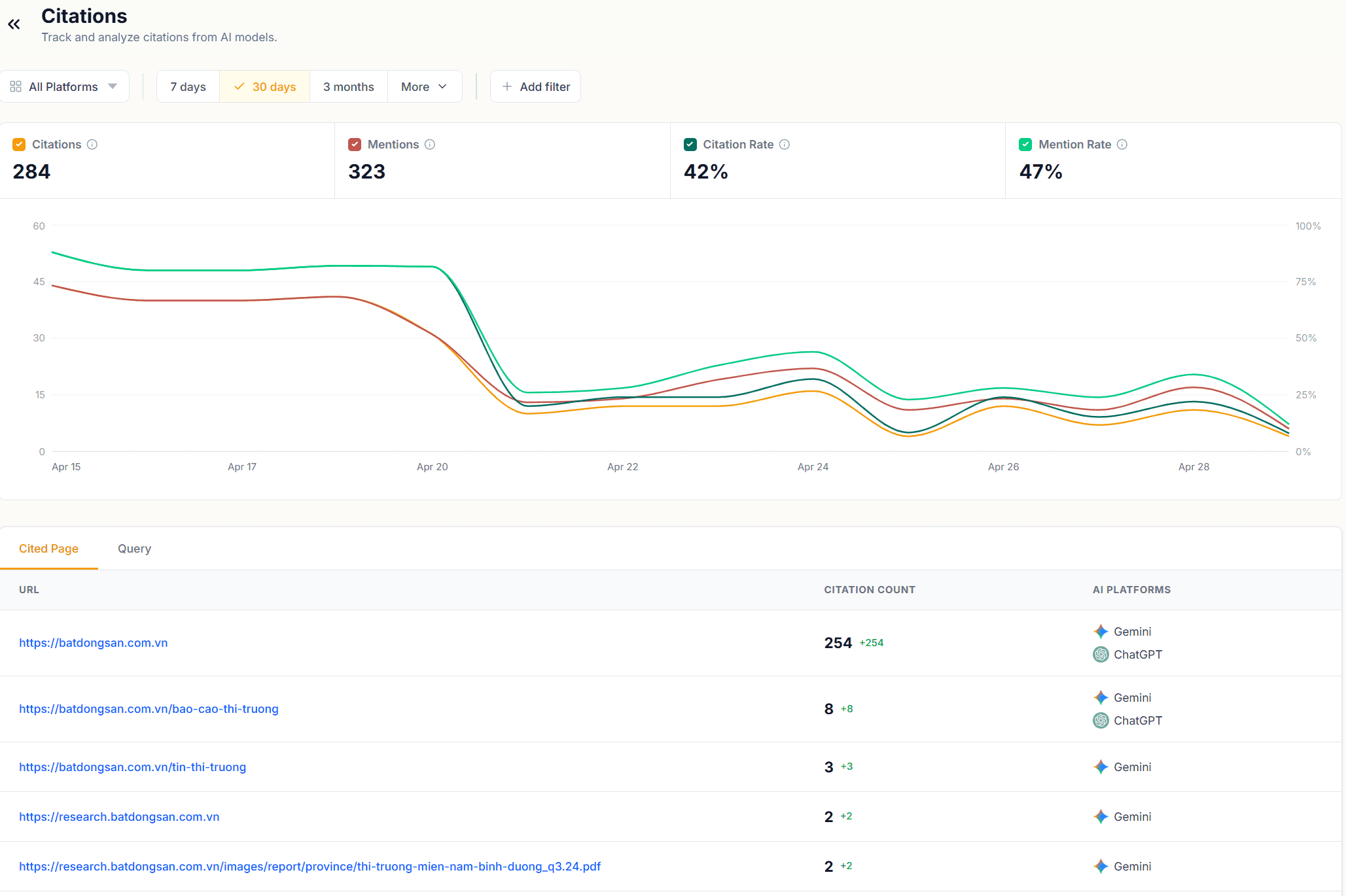
The Citations module opens with four metrics: Citations, Mentions, Citation Rate, and Mention Rate.
These figures mirror what you saw in the Narrative Summary header, but with one key difference: here you can filter them by URL or by query. Select a specific page or query and all four metrics recalculate to show only the citation and mention activity for that filter. That makes this module your primary tool for page-level and query-level citation auditing, not just brand-level monitoring.
The time series chart below the metrics plots Citation Rate and Mention Rate together over your selected window. A Citation Rate line that tracks close to the Mention Rate line means your page earns a citation most times it gets mentioned. A widening gap between the two lines over time is a signal worth investigating: your page is being mentioned more without the citation following.
Cited Page Tab
The Cited Page tab lists every URL that earned at least one citation in the selected time window. Each row shows the URL, its citation count, and the AI platforms that cited it.
Reading citation counts. In the example data here, the root domain accounts for the large majority of citations, with deep-linked pages each earning one or two. That kind of distribution is common early in an AI visibility program. Over time, you want to see citation volume spreading across more URLs, each tied to specific query intents. A citation profile concentrated on one URL means a single page is doing most of the work across many different queries.
AI platform column. The platforms listed next to each URL tell you where that page has traction. A URL cited by both Gemini and ChatGPT has broad platform reach. A URL cited by only one platform may reflect differences in how each model indexes or retrieves content. If a page you consider authoritative is missing from one platform's citations, that is a content gap to address on that platform's terms.
Query Tab
Switch to the Query tab to see citations organized by query rather than by URL. Each row shows a query, its citation count, and the AI platforms that triggered a citation for that query.
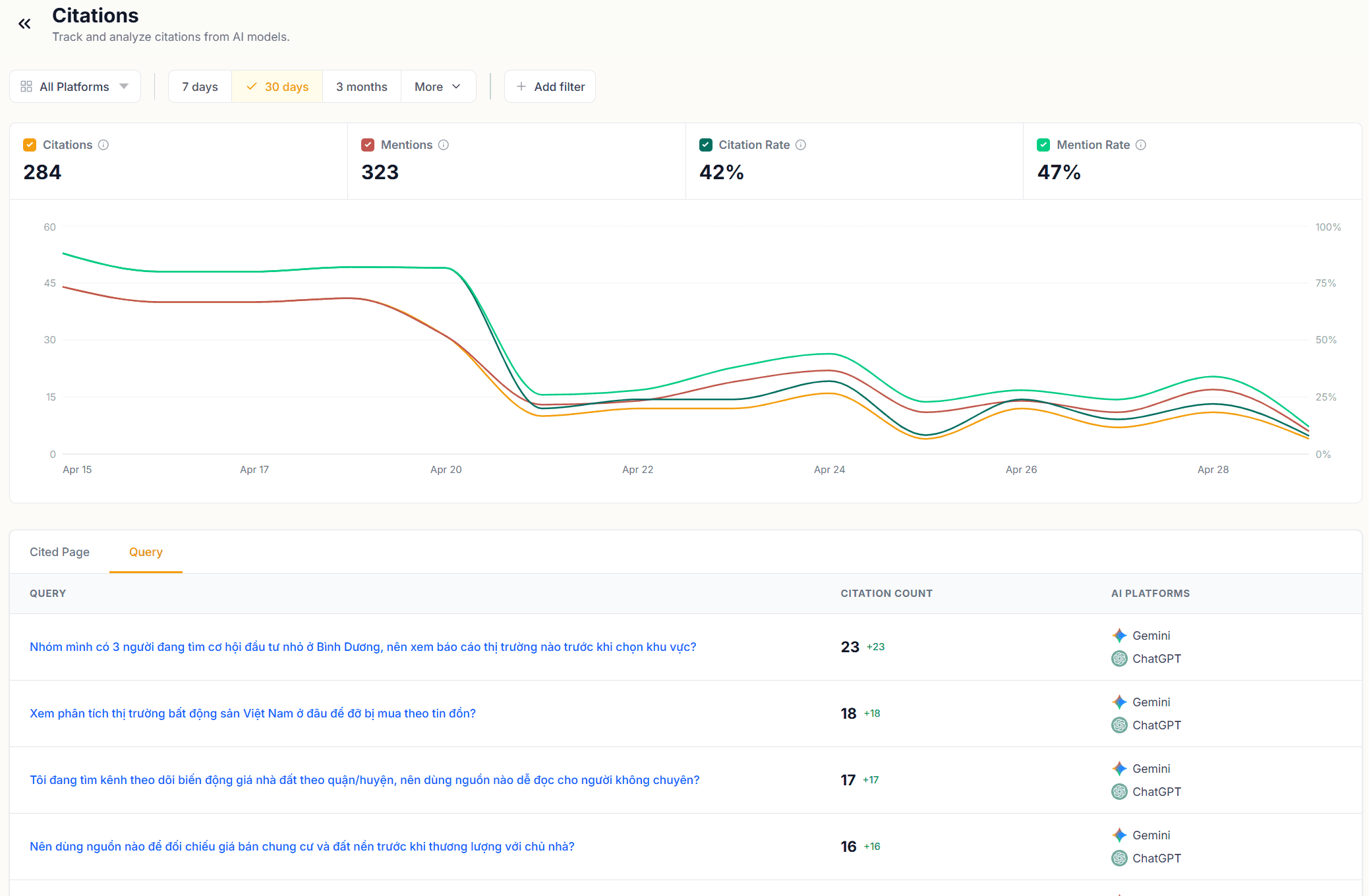
This view answers a different question: not which pages earn citations, but which questions prompt AI models to reach for a source. A query with a high citation count is one AI models treat as requiring a cited source. A query with mentions but no citations is one AI models answer from training data alone.
Cross-reference the Query tab against your AI Response Insights data. If a query appears in both places, you can trace the full chain: the query triggered a response, the response mentioned your brand, and a citation did or didn't follow. The Citation count in this tab tells you which outcome is more common for that query.
Filtering by URL
The URL filter at the top of the module is where the Citations module becomes a triage tool. Type any domain or path into the filter and the entire view, both tabs and the time series, updates to show only citations associated with that URL.
Use this to audit individual pages. Filter to a URL you published or updated in the last week and check whether citation volume has grown since the change. Filter to a competitor's URL to see which of your tracked queries they are being cited for. That query list is a direct content brief: those are the questions for which AI models prefer their source over yours.
Triage Sequence
Open the Cited Page tab and sort by citation count. Identify any URL with a high citation count but low platform diversity, cited on one platform but not the other. That page has a platform-specific gap.
Switch to the Query tab and look for queries with mentions but zero citations. Those are the queries AI models answer from memory rather than from a live source. Adding fresh, citable content targeting those queries gives AI models a source to reach for.
Filter by your highest-traffic URLs and check the time series. A declining Citation Rate on a page that performed well in an earlier period is a flag: either the content has aged, a competitor has published something AI models now prefer, or the query intent has shifted. The Query tab, filtered to that URL, shows which specific queries drove the decline.
Next in this series, Part 7: Reverse-Engineering LLM Logic covers how to read raw AI responses in the AI Response Insights module and use the Fan-out, Sentiment, and Citations tabs to understand why AI models answer the way they do.
Share on social media