Extracting AEO Content Briefs from Semantic Sentiment Maps
Semantic Sentiment Maps turn AI response language into content briefs by showing which positive, neutral, and negative keywords models use for a brand, helping teams reinforce strong associations, convert neutral attributes into differentiators, and address recurring concerns with citable evidence.

Ly Phan
AI Visibility Researcher and Editor
Update on
Product Mechanics

Welcome to Part 9 of the Operyn Product Guide Series. (If you are just joining us, start with Part 1: Calibrating Your AI Tracking Environment.)
In Part 7, we covered the Sentiment tab as one of six tabs in the AI Response Insights query detail view. Part 9 goes deeper on sentiment, not as a reputation metric, but as a content strategy signal.
What Sentiment Measures
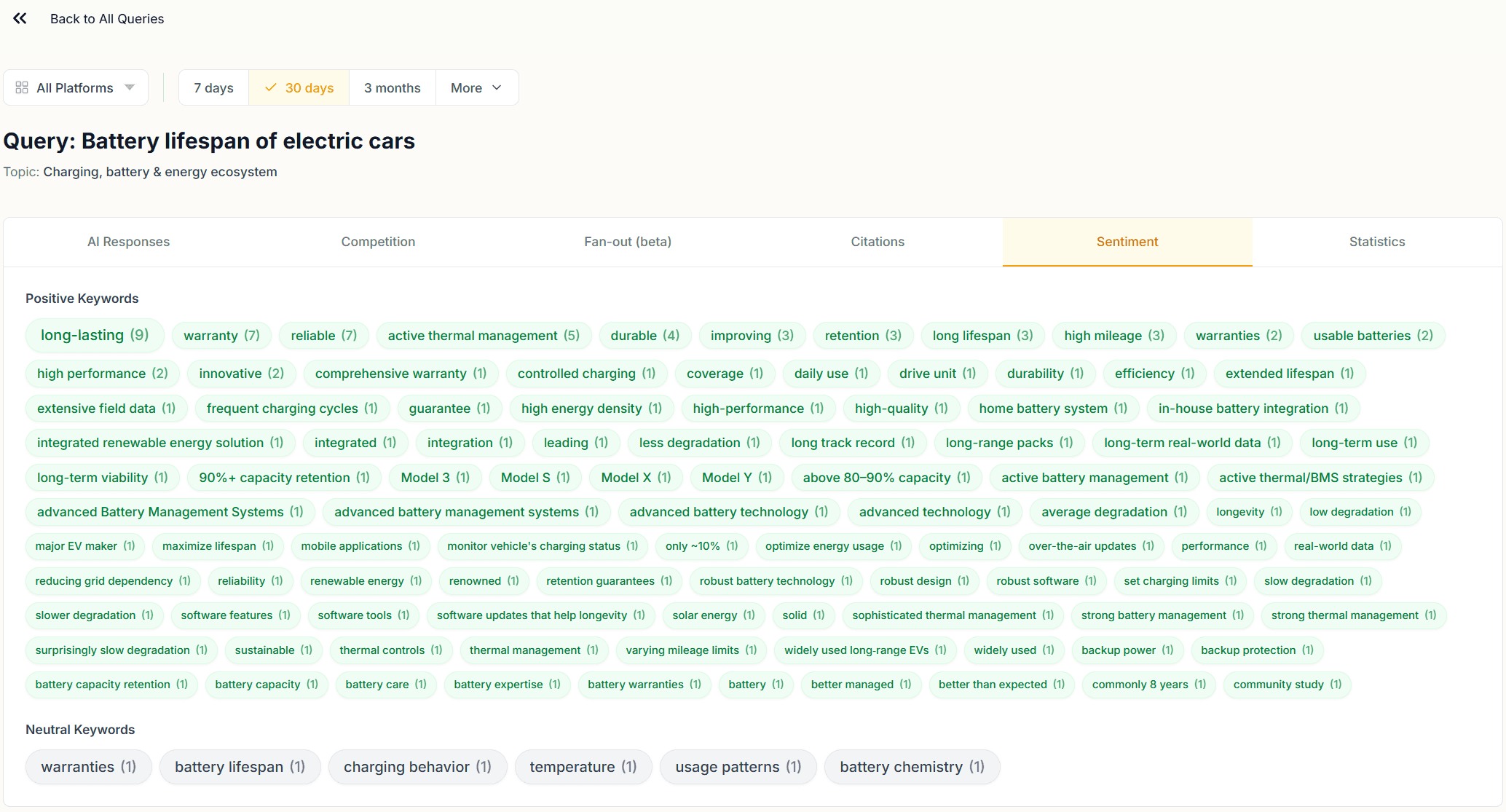
Sentiment in Operyn is not a measure of whether people like your brand. It surfaces the keywords AI models used when responding to a query, grouped into Positive Keywords, Neutral Keywords, and Negative Keywords, each with a frequency count.
The keyword clouds tell you what language AI models reached for when framing your brand in their responses. A keyword like "long-lasting (9)" means AI models used that exact term nine times across responses to that query. That is the semantic map of how the model understands your brand for that question.
Open AI Response Insights, select a query, and go to the Sentiment tab. The keyword clouds are your primary material.
Reading the Keyword Clouds
The positive keyword cloud shows the attributes AI models associate with your brand when responding favorably. High-frequency keywords are the claims AI models make about you most often. Lower-frequency keywords appear in fewer responses but may signal emerging associations worth reinforcing.
The neutral keyword cloud shows terms that appeared in informational or comparative contexts, without a clear positive or negative charge. These are often category-level terms: features, technical specifications, or product attributes that AI models reference without an evaluative frame.
Negative keywords, where they appear, show the concerns or limitations AI models surfaced. A keyword appearing more than once in the negative cloud means the model encountered that concern across multiple responses, not just one.
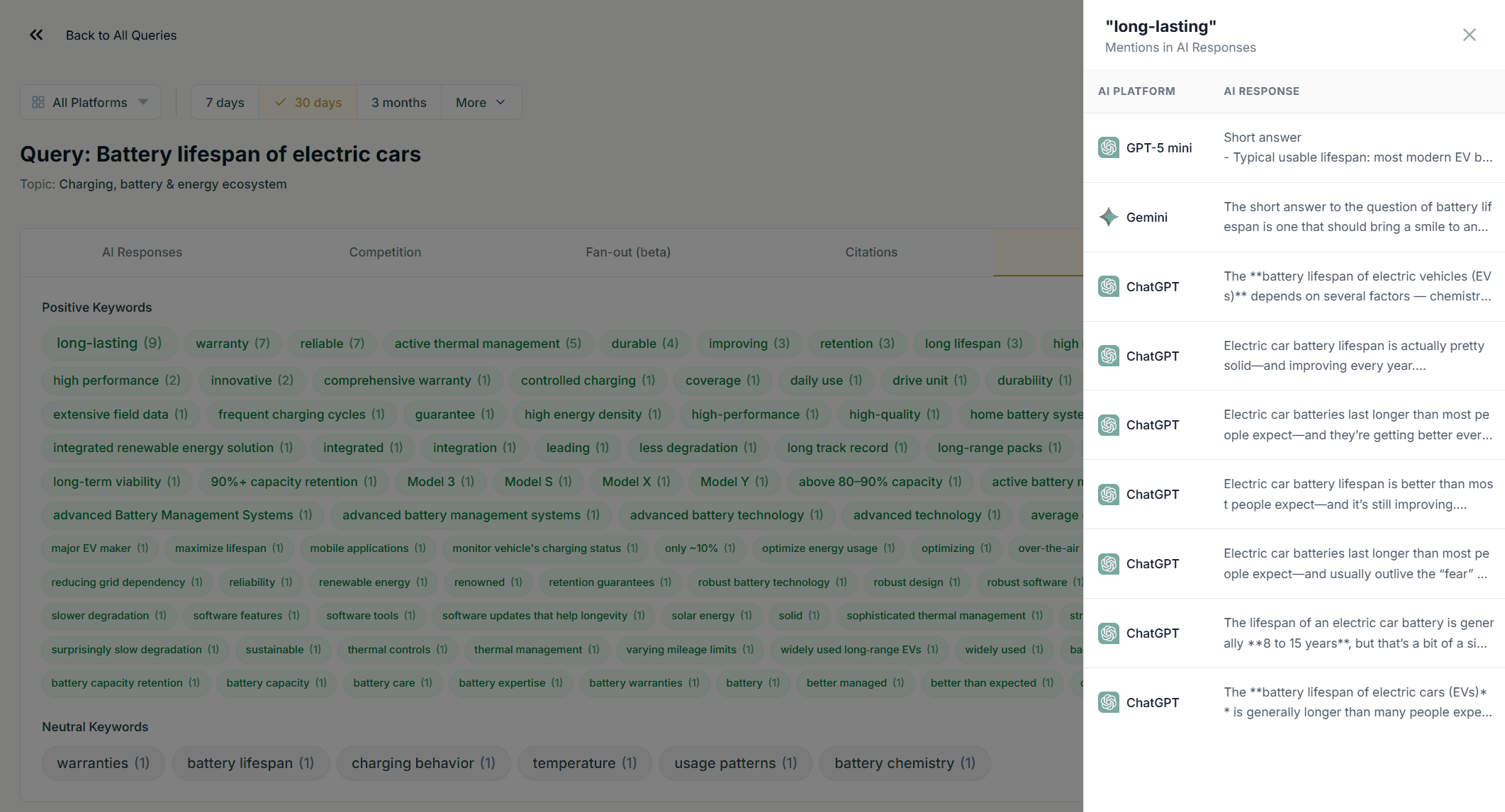
Click any keyword to open a side panel showing the AI platform and the full response where that keyword appeared. That is where you read the context behind the label: how the term was used, what claim it was attached to, and which platform produced it. The keyword cloud tells you what AI models are saying about your brand. The side panel tells you how.
Read across all three clouds together. The balance between positive and neutral keyword volume tells you whether AI models are recommending your brand or describing it. A large positive cloud with a thin neutral cloud means strong endorsement language. A large neutral cloud relative to the positive cloud means AI models are citing your brand as a reference rather than a recommendation.
Turning Keyword Clouds into Content Briefs
The most direct use of the Sentiment tab is converting keyword frequency into content priorities.
Positive keywords tell you what to reinforce. High-frequency positive keywords are the claims AI models make about your brand most often. If a keyword like "long-lasting" appears nine times, AI models have formed a strong association between your brand and that attribute. Check whether that association is supported by a specific page on your site. If it is, that page is working. If it isn't traceable to any specific piece of content, AI models are making a claim you haven't substantiated. Publishing content that supports that claim gives the model a source to cite alongside the association.
Neutral keywords show you where the gaps are. Neutral keywords show the attributes AI models describe without endorsing. A term appearing frequently in the neutral cloud but not in the positive cloud is an attribute your brand is known for but not credited for. Content that reframes that attribute as a differentiator, with evidence, can shift it from the neutral cloud to the positive one over time.
Negative keywords reveal what competitors are exploiting. A keyword in the negative cloud that appears more than once is a concern AI models encountered across multiple responses. Identify whether a competitor is framing that concern as a solved problem in their content. If so, their content is shaping how the model frames the category. A page that addresses the concern with data is the response.
Comparing Sentiment Across Queries
Sentiment at a single query gives you a snapshot. Comparing keyword clouds across all queries in a topic gives you the full picture of how AI models position your brand within that topic cluster.
Pull all queries for a topic from AI Response Insights. For each one, note the balance between positive and neutral keyword volume. Look for patterns: queries where neutral keywords dominate point to a content gap. Queries where the positive cloud is thin relative to other queries in the same topic point to weaker brand associations for that specific question.
A topic where most queries return strong positive keyword clouds but one or two return mostly neutral is a different problem from a topic where neutral keywords dominate across the board. The first case needs targeted attention on specific queries. The second case points to a broader positioning gap that no single piece of content can fix.
Connecting Sentiment to Citation Rate
Sentiment and citation rate are related but not the same. A query can return positive sentiment with no citation, meaning AI models speak well of your brand from training data without reaching for a source. A query can return neutral sentiment with a high citation rate, meaning AI models cite your content as a reference without endorsing it.
The combination to prioritize is neutral sentiment with low citation rate. That is a query where AI models neither endorse your brand nor cite your content. A content brief targeting that query should do two things: provide a citable source (a specific URL with clear, structured information) and shift the framing toward a recommendation rather than a neutral reference.
Next in this series, Part 10: Managing Up covers how to translate your AI visibility data into revenue risk framing for your CMO, including which metrics to lead with and how to connect citation trends to pipeline impact.
Share on social media